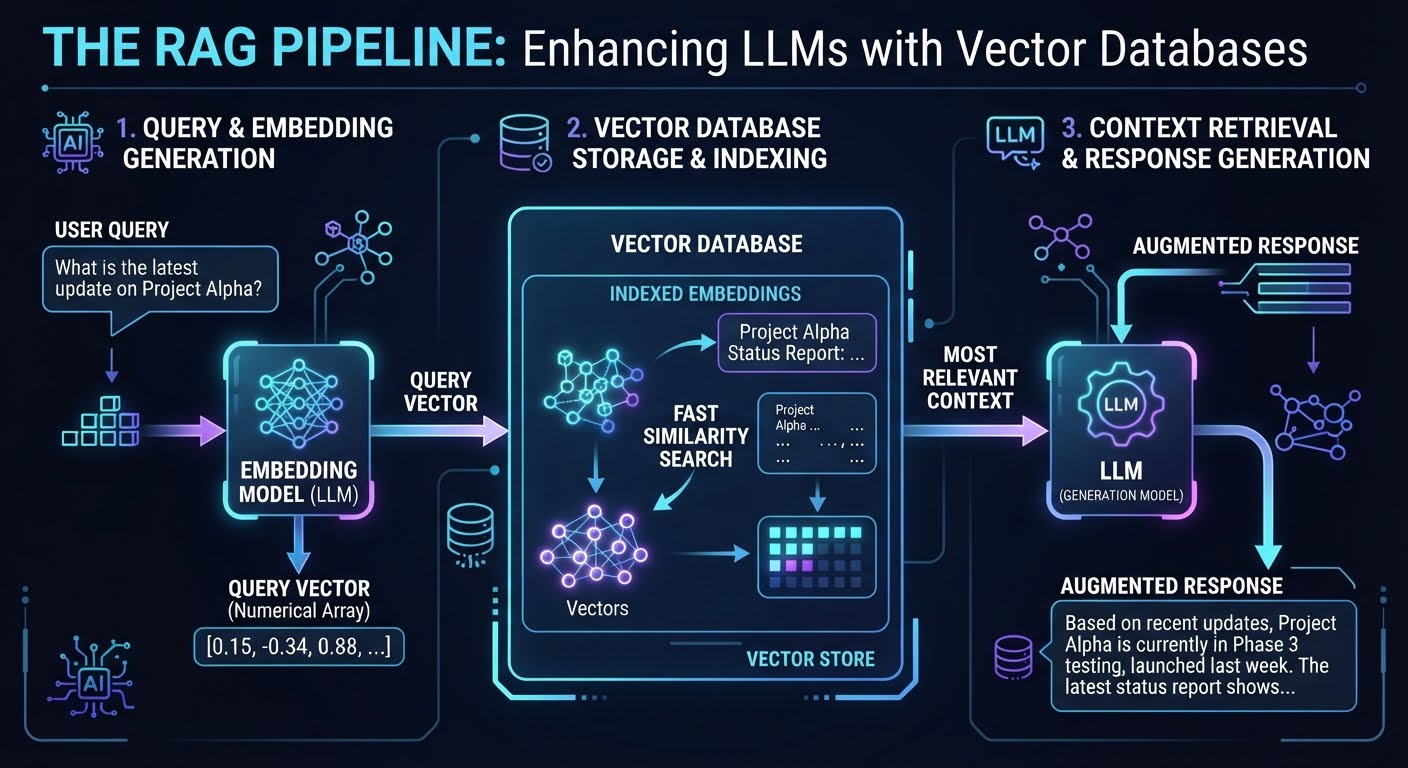
At its core, a vector database is a specialized storage engine designed to handle embeddings.
While a traditional database stores data in tables (SQL) or documents (NoSQL) using exact keys or text matches, a vector database stores data as high-dimensional vectors (arrays of numbers).
The Core Concept: Embeddings
To get data into a vector database, you pass raw data (text, images, audio) through an Embedding Model. This model transforms the data into a vector that represents its semantic meaning.
- Example: In a vector space, the vectors for “Dog” and “Puppy” will be mathematically close to each other, while the vector for “Spaceship” will be very far away.
How It Works: Similarity Search
Instead of searching for a keyword, you perform a Similarity Search. When you query the database, your query is also converted into a vector. The database then finds the vectors closest to that query vector using distance metrics, such as:
- Cosine Similarity: Measures the angle between vectors (focuses on direction/orientation).
- Euclidean Distance: Measures the straight-line distance between points.
- Dot Product: Measures both magnitude and direction.
How Vector Databases are used with LLMs
LLMs have two primary limitations:
- Knowledge Cutoff: They only know what they were trained on up to a certain date.
- Context Window: They can only process a limited amount of text at once.
Vector databases solve this via a pattern called RAG (Retrieval-Augmented Generation).
The RAG Workflow
Instead of trying to feed a 1,000-page manual into an LLM prompt, the system does the following:
- Indexing (The Prep):
- Chunking: Break a large document into smaller, overlapping pieces (e.g., 500 words each).
- Embedding: Convert each chunk into a vector using an embedding model.
- Storage: Save these vectors in the vector database.
- Retrieval (The Query):
- The user asks a question.
- The system converts the question into a vector.
- The vector database returns the top N most similar chunks (the “most relevant” parts of the documentation).
- Generation (The Answer):
- The system constructs a prompt: “Using the following provided context: [Retrieved Chunks], please answer the question: [User Question].”
- The LLM generates an answer based on the provided facts, reducing hallucinations and providing up-to-date information.
Practical Tradeoffs
| Approach | Pros | Cons |
|---|---|---|
| Fine-tuning | Model learns a specific style or domain language. | Expensive, static knowledge, “black box” updates. |
| RAG (Vector DB) | Real-time updates, provides citations/sources, cheaper. | Dependent on embedding quality; retrieval can miss nuances. |
In short: A vector database acts as the external long-term memory for an LLM, allowing it to access specific, private, or current information without needing to be retrained.
Are Vector Databases Still Needed?
the video explores the continued relevance of vector databases in the era of Large Language Models (LLMs) and AI agents. The author proposes a “Retrieval Pyramid” to determine the most efficient retrieval method based on the workload:
- No Retrieval (Long Context): Simply pasting all data into the prompt.
- Keyword Search (e.g., Grep): Using literal text matching, often refined by an AI agent.
- Vector Index: Implementing semantic search within an existing general-purpose database.
- Dedicated Vector Database: Using specialized systems for massive-scale vector storage and retrieval.
The core argument is that one should only move up the pyramid when the scale or complexity of the data strictly requires it, avoiding unnecessary architectural overhead.
